Skip to content
MRP Software

MRP for small shops,
built right in.

Work Orders + cutlist import Β· live on Enterprise

Enterprise MRP is overkill for small shops. InventoryQuick gives you work orders, cutlist Excel/CSV import, project-driven forecasting, and an AI assistant β€” flat $349/mo Enterprise, unlimited users, parts, and locations.

Not ready to start the trial? Get a 2-minute guided walkthrough by email β€” no call, nothing to cancel.

Product tour

See it in action.

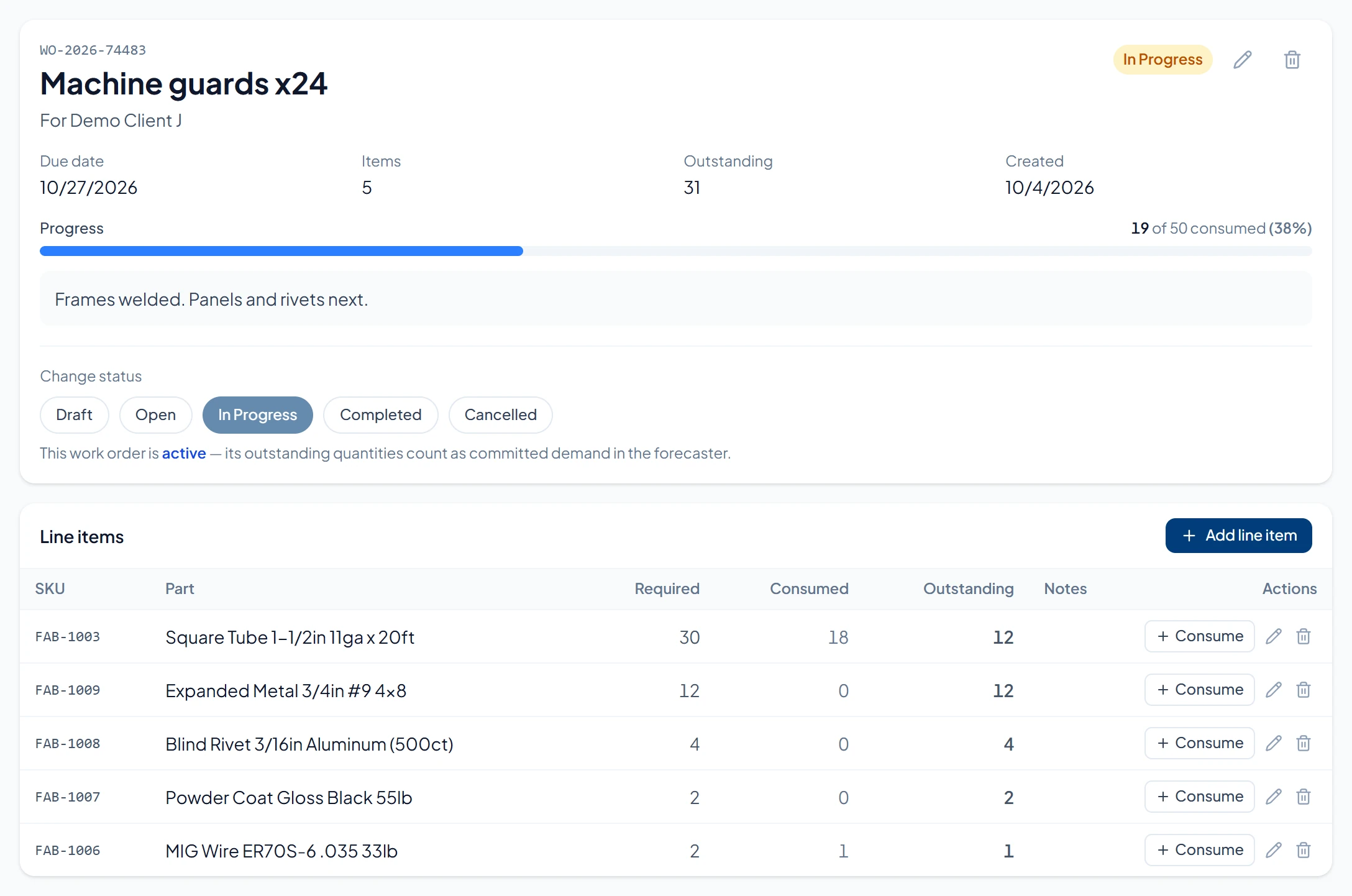
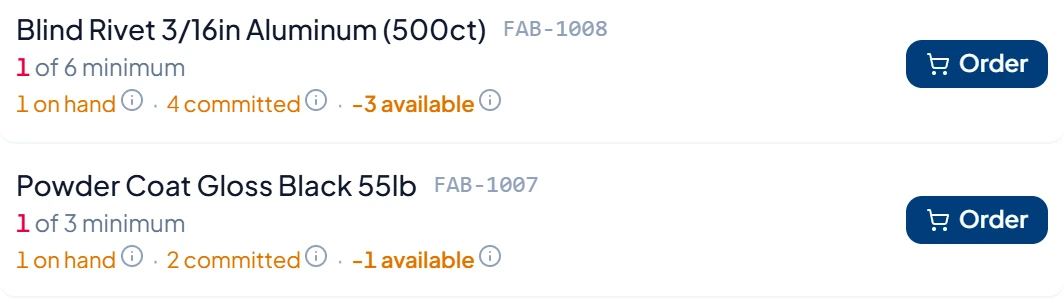
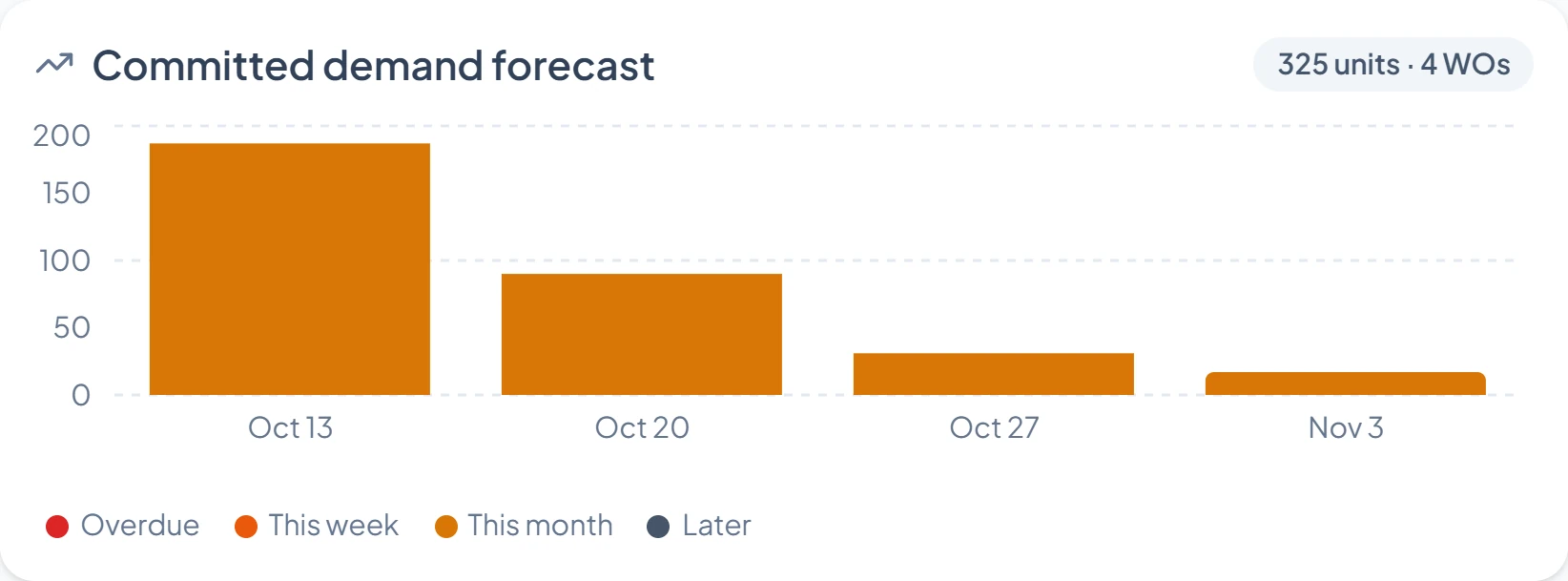
The dashboard, work orders that commit parts, and the assistant β€” the screens behind the $349/mo Enterprise plan. Tap any screen to enlarge.

app.inventoryquick.com/dashboard
app.inventoryquick.com/work-orders
app.inventoryquick.com/work-orders/job
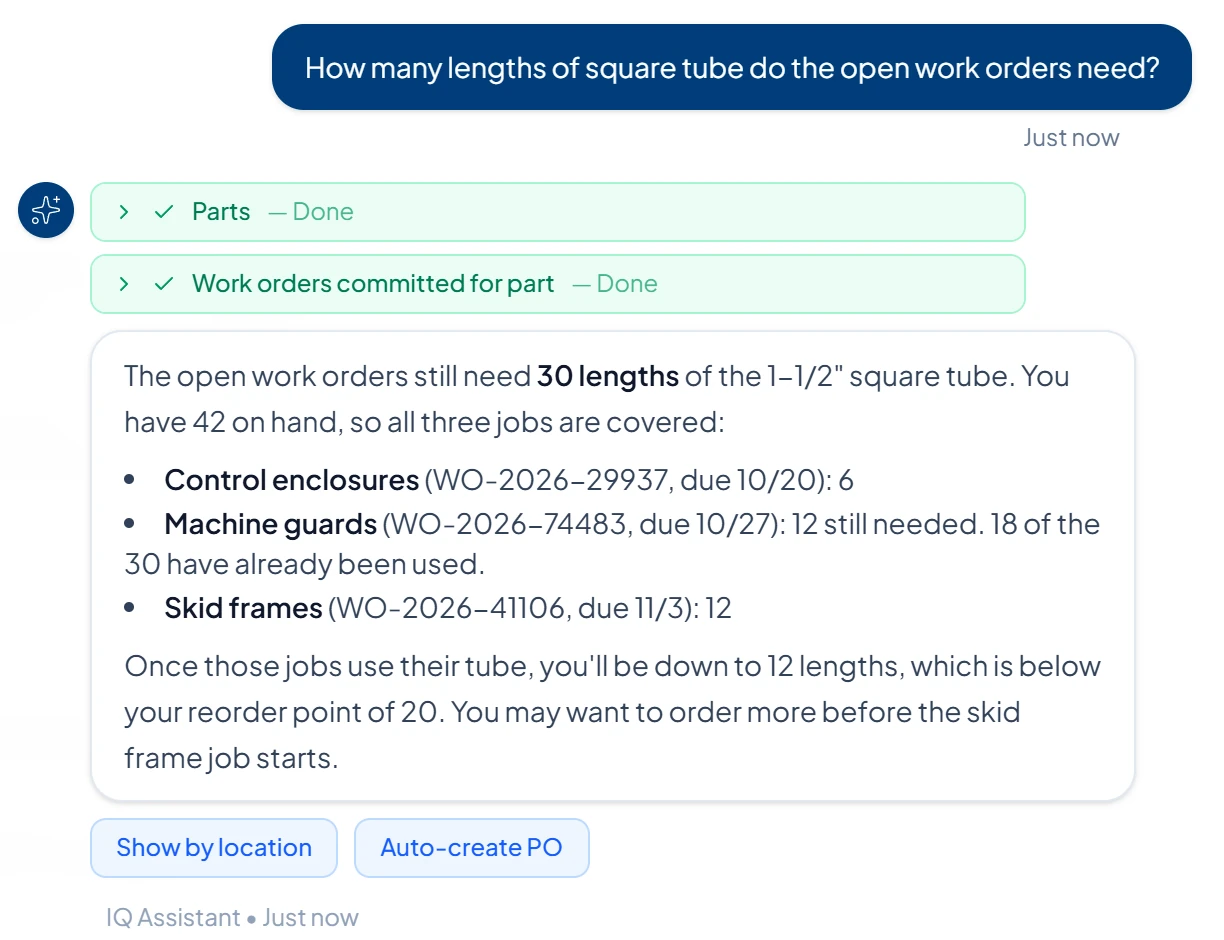
app.inventoryquick.com/assistant
Ask the assistant anything about your inventory and open work orders β€” it runs the query and shows the breakdown.
Guided walkthrough β€” just your email

Want a closer look first?

We'll email you a 2-minute guided walkthrough β€” the real screens behind work orders, committed demand, and auto-POs, annotated for your kind of shop. No call, no commitment.

Ready to dive in? Start the 7-day trial β†’

Small shops

MRP for small shops, not enterprises.

Most MRP software is built for high-volume manufacturers with multi-level nested BOMs, real-time scheduling, and dedicated production planners. For a cabinet shop running 30 jobs a month, a sign shop cutting substrate, or a metal-fab crew building custom railings, that’s overkill. InventoryQuick Enterprise ($349/mo) gives you the parts of MRP small shops actually use β€” work orders, cutlist import, project-driven forecasting, auto-PO β€” without the complexity or the per-user fees.

Job-shop and custom-build work

Every project is a work order. Import the cutlist from Cabinet Vision, Fulcrum, or a generic Excel sheet. We auto-detect SKU and quantity; every other column (width, length, thickness, grain β€” or any custom field you ship) becomes per-line metadata via our universal JSONB schema, so the same import works for woodworking, metal fab, sign shops, and kitting. Open WOs feed your demand forecast so you know exactly what parts to buy for next month, not just what you used last month.

What we don't do

No multi-level nested BOM rollups, no production or shop-floor scheduling, no capacity planning, no routings or operations sequencing, no labor tracking, no shop-floor terminals, and no batch, lot, or serial traceability. There is no saved reusable bill of materials either β€” each work order carries its own material list. We also store cutlist dimensions rather than acting on them: there is no nesting or yield optimization, so we will not tell you how many sheets your parts cut from. If any of that is a core requirement, Katana, MRPeasy, and Fishbowl are purpose-built for it and are the honest recommendation. This list is what we do not build, not a roadmap.

The loop

From the job on the board to the material on the rack.

A stock counter tells you what you have. A job shop needs to know what is already spoken for. This is the loop, in the order you actually run it.

  1. 01

    The job becomes a work order

    Import the cutlist from Cabinet Vision, Fulcrum or a plain Excel sheet. SKU and quantity are auto-detected; every other column you ship β€” width, length, thickness, grain, finish, any custom field β€” is kept per line, so the same import works for casework, metal fab, signage and kitting without setup for your trade.

  2. 02

    Its material is committed, not just listed

    Each line holds a required quantity and a consumed quantity. The difference is outstanding β€” material this job has spoken for but not yet pulled. That is what separates a work order from a note on a whiteboard.

  3. 03

    Outstanding material rolls into the forecast

    Open and in-progress work orders are summed per part and fed into demand forecasting alongside sales history, and shown on the dashboard as on-hand against committed. You are buying for the jobs on the board, not only for what last month consumed.

  4. 04

    On-hand crosses your reorder point and you get told

    Set a reorder point per part and the alert fires when on-hand drops to it. Be aware of the seam here: the alert compares on-hand against your reorder point and does not subtract committed demand, so on a heavily committed part the forecast and dashboard will show the shortfall before the alert does. A part with no reorder point set never alerts at all.

  5. 05

    The purchase order goes out

    Raise the PO against the supplier, with tax-aware totals that match the invoice, and receive partially when only some of it turns up. On Enterprise, auto-PO can draft the order for you when stock crosses the line β€” it drafts only, and a person approves and sends it. Nothing is ordered on your behalf.

  6. 06

    The job consumes it and the loop closes

    Record what the job actually pulled; outstanding drops and the forecast follows. While a part still has material outstanding on an open job it cannot be deleted out from under that job β€” you have to finish or cancel the work order first.

Work orders, cutlist import and the committed-demand forecast are the Enterprise plan ($349/mo flat, every user included). The 7-day trial runs the whole loop with nothing held back β€” what happens on day 8 is below.

What's included

Built-in features for MRP workflows.

Every InventoryQuick Enterprise plan includes the MRP feature set. No add-on modules, no per-user fees, no implementation project.

Work Orders & Cutlist

Import cut lists from Excel (.xlsx) or CSV in seconds β€” no converting first. We auto-detect SKU and quantity, including the vocabulary the optimisers use (CutList Plus exports Copies; others use piece counts), and every other column β€” width, length, thickness, grain, or any custom field β€” becomes per-line metadata. Woodworking, metal fab, sign shops and kitting all work without schema changes.

Project-Driven Forecasting

Open work orders feed demand predictions alongside historical sales. Know what parts you’ll need for the next 7-90 days based on committed projects, not just past consumption.

Per-Job Material Lists

Each work order carries its own list of parts and quantities, so outstanding jobs roll up into committed demand against on-hand stock. This is a per-job list, not a saved reusable BOM β€” you build or import the list for each job.

Reorder Points & Low-Stock Alerts

Set a reorder point per part and get an alert when on-hand stock drops to it. Committed demand from open work orders is shown in the forecast and on the dashboard rather than inside the alert threshold β€” so a shortfall is visible there before on-hand runs down, but the alert itself watches on-hand against your reorder point.

Barcode Scanning

Print barcodes for raw materials and finished goods. Scan with your phone or a USB/Bluetooth scanner. Track movement between shop floor, warehouse, and trucks.

IQ Assistant

Ask "how many sheets of 3/4 plywood do I need for the open work orders?" The assistant runs the query and shows the answer with the breakdown.

Compare

How InventoryQuick compares to other MRP.

The MRP market is full of tools built for mid-market and enterprise manufacturers. Here’s how InventoryQuick stacks up against the major options for small shops.

SoftwareStarting PricePricing Model
Katana Core$299/mo Core + usageUnlimited users (usage-billed)
MRPeasy$49-149/user/moPer user, from seat one
Fishbowl Essentials$229/mo2 users, annual billing
OdooFree (1 app) / $31/user (annual list, after 12-month intro)Per-user
NetSuiteCustom quote (annual licence)Per-seat, plus modules
InventoryQuick Enterprise$349/mo flatFlat (all users included)

Competitor pricing verified July 2, 2026. See each vendor’s pricing page for current rates. Detailed Katana comparison at InventoryQuick vs Katana.

Industries

Shops that use InventoryQuick MRP.

From cabinet shops importing cutlists to metal-fab crews tracking profile stock to sign shops cutting substrate β€” the universal attributes schema means one app fits every shop type.

πŸͺš

Cabinet & Woodworking Shops

Import cut lists from CutList Plus, Cabinet Vision, Fulcrum, or a plain spreadsheet β€” .xlsx uploads directly. Per-line attributes (length, width, species, edge banding) map automatically. Built in partnership with a working cabinet shop.

πŸ”§

Metal Fabrication

Track raw stock (sheet, tube, angle, bar) by profile and thickness. Work orders commit footage against your inventory pool, and the dashboard shows on-hand against what open jobs have already spoken for.

πŸ“’

Sign Shops

Substrate tracking by sheet count and SKU. Cutlist import for digital print jobs. Demand forecasting based on committed sign installations.

πŸ”©

Light Fabrication & Welding

Job-shop work orders with per-line attributes. Material consumption tracked against on-hand inventory. No batch, lot or serial traceability, so this does not cover ISO or quality-certification traceability.

πŸ“¦

Kitting & Assembly

Build kits from a parts list. Committed demand shows up in your forecasting before the parts ship, so component shortfalls surface early.

🏭

Custom & Job Shops

Every project is a work order: what it needs, what it has consumed, and what is still outstanding. Those outstanding quantities drive the purchasing forecast. Purchase orders are raised against a supplier rather than linked to a job, and there is no per-project cost or margin tracking.

πŸ› οΈ

Repair Shops

Service tickets as work orders. Parts pulled from inventory get committed to the ticket, and the customer name sits on it as free text. Labour hours can be stored as a per-line attribute, but nothing totals or reports them, and tickets are not linked to a customer record.

🎨

Screen Printing

Ink, blank stock, and screens tracked as raw materials. Job work orders allocate inventory by run. Forecast next month’s ink and blank reorders.

βš™οΈ

Production Assembly

Each build is a work order carrying its own material list, drawn from your parts catalog. There is no saved reusable BOM β€” you build or import the list per job β€” and no multi-level rollup, so this fits builds that do not need sub-assemblies.

Pricing

Flat-rate pricing.

Work Orders + Cutlist (MRP) included on Enterprise ($349/mo). Unlimited users, parts, and locations.

Starter

$19/mo

250 parts

  • 2 users
  • Barcode scanning
  • Purchase orders
  • CSV import

Pro

$49/mo

500 parts

  • 3 users
  • 100 IQ Assistant messages
  • 2 integrations
  • Photo capture

Business

$149/mo

5,000 parts

  • 15 users
  • Multi-location
  • Custom fields
  • API access
MRP Tier

Enterprise

$349/mo

Unlimited

  • Work Orders + Cutlist (MRP)
  • Project-driven forecasting
  • Committed-demand reorder alerts
  • Unlimited users, locations, parts

See full pricing details β†’

Why switch

Why shops switch to InventoryQuick.

  • AI assistant built in β€” ask "what do I need for next month’s WOs?"
  • Cutlist .xlsx/CSV import β€” CutList Plus, Cabinet Vision, Fulcrum or a generic spreadsheet works day one
  • Per-line attributes (width, length, thickness, grain β€” or any custom column from your file) via universal JSONB schema β€” no per-vertical setup
  • Project-driven forecasting β€” open work orders feed demand predictions, not just sales history
  • Flat $349/mo Enterprise β€” unlimited users, locations, and parts (Katana scales up by volume)
  • Setup in 5 minutes β€” no consultants, no implementation project
Day 8

What happens when the trial ends.

Most trials answer this after you have put a week of work in. Here it is first.

Days 1–7 β€” the whole product

The trial runs at Enterprise level, so work orders, cutlist import and the committed-demand forecast are all live. You won’t be charged for 7 days. Three things that cost us money per use are capped for the week rather than unlimited β€” 100 AI photo recognitions, 500 assistant messages and 25 price monitors β€” which is far more than a trial needs and is not a limit on what you can try.

Day 8, if you do nothing β€” read-only

Your account goes read-only. Your data stays; nothing is deleted on expiry. But you cannot add items, raise purchase orders, or reach work orders at all until you pick a plan. We would rather you knew that now than found it on the morning you needed to cut a job.

Day 8, on a plan below Enterprise

Inventory, purchase orders, sales orders and barcode scanning all keep working from $19/mo. Work orders are the part that stops: you can still open, view, cancel and delete the jobs you already created, but creating or editing them needs Enterprise. That view-and-unwind route exists on purpose, so material committed to an old job never becomes unreachable.

Day 8, on Enterprise β€” $349/mo flat

The loop above keeps running, with every user, location and part included. No per-seat maths as the shop grows, and no implementation project to schedule.

FAQ

Frequently asked.

What is MRP software?

MRP (Material Requirements Planning) software takes your demand (sales orders, work orders, forecasts), compares it against what you have on hand, and tells you what to make, what to buy, and when. Traditional MRP systems were designed for high-volume manufacturers with complex multi-level BOMs. Modern "light MRP" tools like InventoryQuick focus on small shops and job-shop work β€” work orders, cutlist tracking, and project-driven forecasting β€” without the enterprise complexity.

Is InventoryQuick an MRP or an ERP?

InventoryQuick is purpose-built inventory and asset management with MRP features (work orders, cutlist import, committed demand, project-driven forecasting) on the Enterprise plan ($349/mo). It is not a full ERP β€” there is no built-in accounting, CRM, or HR. For shops that need inventory + light MRP + an AI assistant at flat pricing, that’s the design. If you need accounting bundled, look at Odoo, Fishbowl + QuickBooks, or NetSuite.

How is InventoryQuick MRP different from Katana?

Katana is purpose-built for high-volume manufacturing with multi-level nested BOM rollups, real-time shop-floor scheduling, and batch tracking β€” starting at $299/mo Core and scaling up with usage. InventoryQuick Enterprise at $349/mo includes Work Orders + cutlist Excel/CSV import + project-driven forecasting + auto-PO β€” covers the same workflows job-shops and custom-build operations use Katana for, at flat pricing with unlimited users, locations, and parts. For shop-floor scheduling and multi-level BOM, Katana is the better fit. For job-shop and custom builds, InventoryQuick is.

Does InventoryQuick support multi-level BOMs?

Today, no β€” and to be precise about what we do instead, there is no saved reusable BOM record at all. Each work order carries its own list of parts and quantities, built or imported per job, and the outstanding quantities become committed demand that flows to your forecasting. For multi-level nested BOM rollups (sub-assemblies feeding into parent assemblies), Katana, MRPeasy, and Fishbowl are purpose-built. For most small shops doing custom or job-shop work, a per-job material list is sufficient and faster to set up β€” but if a saved, reusable bill of materials is what you are shopping for, we do not have one.

Does it work for woodworking and cabinet shops?

Yes β€” the Work Orders + cutlist build was developed in partnership with a working cabinet shop (May 2026). Import cut lists from Cabinet Vision, Fulcrum, or generic spreadsheets β€” we auto-detect SKU and quantity, and every other column from your file (width, length, thickness, grain, or any custom column) maps into our universal JSONB attributes without per-vertical setup.

What’s the cheapest MRP software for small shops?

For small shops, InventoryQuick Enterprise at $349/mo is one of the lower-priced full-feature options with no per-user fees. Katana starts at $299/mo Core but scales with usage. MRPeasy is $49 per user per month from the first seat (Starter), so its total scales directly with headcount. Fishbowl Essentials starts at $229/mo for 2 users (annual billing). For shops just getting started with basic part tracking and POs (not full MRP), InventoryQuick Starter at $19/mo is the lowest entry point and includes barcode scanning and purchase orders.

Can I migrate from Katana, MRPeasy, or Fishbowl?

Yes. Export your parts catalog, work orders, and cutlists as CSV from your current MRP. InventoryQuick’s import tool auto-detects column names and maps SKU, quantity, cost, location, and category. Active work orders and cutlists import via Excel/CSV β€” per-line attributes map into our universal JSONB so woodworking, metal fab, and sign shops all work without schema changes. Most migrations take under an hour.

Does InventoryQuick include AI?

Yes. The IQ Assistant is built into every paid plan (with message limits by tier). It answers questions about your inventory and work orders β€” "how many sheets of 3/4 plywood do I need for next month’s WOs?", "which parts are below trigger?", "create a PO for the items short on the Williams kitchen project" β€” and can execute the action when you confirm. No other MRP at this price point has this.

How long does setup take?

About 5 minutes to create an account and import your parts catalog (CSV). Importing your first cutlist takes another 5 minutes. Fishbowl, by contrast, states on its own pricing page that it requires an implementation package with every purchase, including a 6-8 week training certification, and does not publish what that package costs β€” you book a call to find out. There are no required consultants and no implementation project here.

Is there a free trial?

Yes β€” the free trial runs at Enterprise level, so Work Orders, cutlist import and the committed-demand forecast are all included. You pick a plan and enter a card to start it, and you won’t be charged for 7 days. Three features that cost real money per use are capped for the week rather than unlimited: 100 AI photo recognitions, 500 assistant messages and 25 price monitors. To keep Work Orders and cutlist after the trial, choose Enterprise at $349/mo.

What happens to my work orders when the trial ends?

Nothing is deleted when the trial ends. If you do not pick a plan the account goes read-only, so your data is still there but you cannot add items, raise purchase orders or open work orders until you subscribe. If you subscribe below Enterprise, inventory, purchase orders, sales orders and barcode scanning keep working from $19/mo, and you can still open, view, cancel and delete work orders you already created β€” creating or editing them is the part that needs Enterprise at $349/mo. That view-and-unwind route exists deliberately, so material committed to an old job never becomes unreachable.

Do low-stock alerts account for material committed to open jobs?

Not in the alert threshold itself β€” the low-stock alert compares on-hand stock against the reorder point you set on that part, and a part with no reorder point set does not alert at all. Committed demand from open and in-progress work orders is surfaced in demand forecasting and on the dashboard as on-hand against committed, so on a heavily committed part the shortfall is visible there before the alert fires. We would rather state that seam than let you find it on a job.

What does InventoryQuick MRP not do?

No multi-level nested BOM rollups, no production or shop-floor scheduling, no capacity planning, no routings or operations sequencing, no labor tracking, no shop-floor terminals, and no batch, lot, or serial traceability. There is also no saved reusable bill of materials: each work order carries its own material list that you build or import per job. If any of those are core requirements, Katana, MRPeasy, and Fishbowl are purpose-built for them and are the honest recommendation.

Ready to try
InventoryQuick MRP?

Your 7-day free trial includes full access β€” Work Orders and Cutlist (MRP) included. Keep MRP on the Enterprise plan. Cancel anytime.

Full access to everything Β· you won't be charged for 7 days